
Is your Nespresso machine blinking orange, leaving you unsure about what to do next? You’re not alone, and this blinking light is more than just a warning—it’s your machine’s way of telling you it needs attention.
Whether it’s a simple cleaning alert, a pod placement issue, or a sign that it’s time to descale, understanding why your Nespresso is blinking orange can save you time and frustration. Keep reading, and you’ll learn clear, easy steps to fix this common problem so you can get back to enjoying your perfect cup of coffee without delay.
You May Like Best One
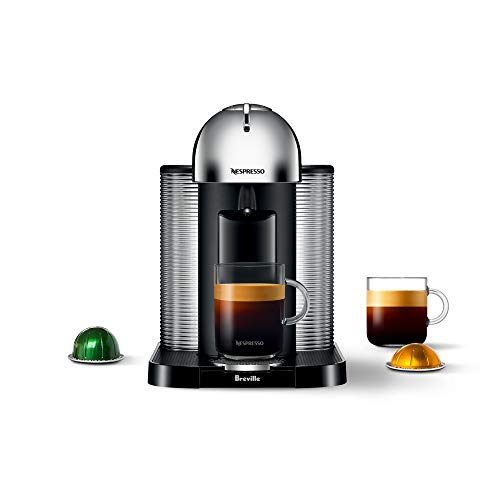
- SINGLE SERVE COFFEE & ESPRESSO MACHINE: Single serve coffee or…
- COFFEE FOR EVERY OCCASION: Brew better coffee at home with Nespresso’s…
- VERSATILE COFFEE MAKER: Brew 4 different cup sizes at the touch of a…
- INCLUDES: One Vertuo Nespresso coffee machine with a large 40 ounce…

- This compact, easy-to-use machine can create more than 30 coffees of…
- Whether you prefer espresso, alto or cold brew, simply choose your…
- Five cup size options and hermetically sealed capsules for grounds…
- Since 1974, De’ Longhi has created iconic products for nearly every…

- SINGLE SERVE COFFEE MAKER: Single serve coffee or espresso at the…
- COFFEE FOR EVERY OCCASION: Brew better coffee at home with Nespresso’s…
- VERSATILE POD COFFEE MAKER: Brew 4 different cup sizes at the touch of…
- SUSTAINABILITY IN MIND: Nespresso capsules are fully recyclable….

- SIGNATURE COFFEES AND ESPRESSOS: Vertuo Pop+ coffee maker offers a…
- COMPACT: Compact design to fit small spaces, with removable 25 fl. oz…
- SIMPLE AND CONVENIENT: One-touch coffee system, 30 second heat up time…
- PRECISION BREWING: unlocks a smooth full-bodied coffee topped with a…

- DUAL ESPRESSO & COFFEE MACHINE: Single serve coffee or espresso at the…
- COFFEE FOR EVERY OCCASION: Brew better coffee at home with Nespresso’s…
- VERSATILE COFFEE MAKER: Brew 4 different cup sizes at the touch of a…
- MILK FROTHER MACHINE INCLUDED: The Nespresso Aeroccino3 provides…
Causes Of Blinking Orange Light
The blinking orange light on your Nespresso machine signals a problem. It alerts you to issues that need attention to keep your coffee brewing smoothly. Knowing the causes helps fix the problem quickly. The light often appears due to cleaning needs, descaling alerts, or errors with the pod or lid.
Cleaning And Barcode Reader Issues
Dirt or coffee grounds can block the barcode reader. The machine reads the pod’s barcode to brew correctly. Wipe the optical sensors inside the brewing chamber with a damp cloth. Make sure no debris blocks the injector head. A blocked reader causes the orange light to blink.
Descaling Alerts
Hard water leaves mineral build-up inside the machine. This build-up affects performance and taste. The blinking orange light warns you it is time to descale. Use a descaling solution as per the instructions. Regular descaling keeps your machine running well and coffee tasting fresh.
Pod Placement And Lid Errors
The pod must sit correctly in the machine. If the pod is misaligned or the lid is not closed firmly, the light blinks. Check that the pod is inserted the right way. Close the lid until it locks in place. This ensures the machine reads the pod and brews properly.
Cleaning The Barcode Reader
The Nespresso blinking orange light often points to a dirty barcode reader. This small part scans the pod’s barcode to brew the perfect coffee. Dirt or coffee residue can block the sensor. Cleaning it keeps your machine working well. Follow these steps to clean the barcode reader safely and effectively.
Accessing The Brewing Chamber
First, open the machine’s head carefully. The brewing chamber holds the pod and barcode reader. Remove any used pod and check for leftover grounds. Use a soft cloth or brush to clear debris. Avoid using water inside the chamber to prevent damage.
Cleaning Optical Sensors
The barcode reader includes two small circular sensors. These are optical lenses that scan the pod. Use a damp Q-tip or microfiber cloth to clean them gently. Wipe away all dust, coffee oils, and residue. Be careful not to scratch the lenses or press too hard.
Checking Injector Head Movement
The injector head is a spiky part that pierces the pod. It should spin and move freely. If sticky or stuck, clean it with a soft cloth. Check for any blockages or buildup around the head. Smooth movement helps the barcode reader scan accurately.
Checking Pod And Lid
When your Nespresso machine blinks orange, the pod and lid are often the cause. Checking these parts helps solve many common issues quickly. Small errors in pod placement or lid locking can stop the machine from working properly.
Carefully inspecting the pod and lid ensures smooth operation and prevents blinking lights. The machine needs to read the pod’s barcode correctly. It also requires the lid to be fully closed to start brewing.
Proper Pod Insertion
Insert the pod gently into the brewing chamber. Make sure it fits snugly without forcing it. The pod must sit flat and aligned with the machine’s guides. Incorrect placement stops the barcode scanner from reading the pod. Always use original pods for best results.
Ensuring Handle Is Locked
Close the lid handle firmly until it locks in place. A loose or partially closed handle triggers the blinking orange light. The machine will not start brewing if it senses the lid is open. Check that the handle clicks shut to confirm it is locked.
Barcode Reading Problems
The machine reads the barcode on the pod to adjust brewing settings. Dirt or coffee residue can block the barcode scanner. Clean the small optical sensors with a soft, damp cloth. Avoid scratching the sensors as this can cause permanent damage. If the barcode is damaged, the machine cannot read it, causing the orange light to blink.
Performing A Factory Reset
Performing a factory reset on your Nespresso machine can solve many issues. This process clears errors and restores default settings. It is helpful if the orange blinking light continues after cleaning. Factory resetting is simple and quick. Follow the steps carefully to ensure success.
Steps For Vertuo Models
First, turn off your machine by pressing the power button. Wait until the machine is completely off. Then, press and hold the power button for 7 seconds. Release the button when the light blinks orange three times. The machine will now reset to factory settings. After the reset, the light should change to steady white. This means the process is complete.
Indicators Of Successful Reset
The main sign of a successful reset is the steady white light. The orange blinking should stop completely. Your machine will be ready to use again. If the light keeps blinking orange, the reset did not work. Repeat the steps or contact Nespresso support. A steady white light means your machine is back to normal.
Other Causes And Solutions
Sometimes the Nespresso blinking orange light points to less obvious problems. These issues need quick attention to keep your machine working well. This section covers other causes and how to solve them.
Empty Water Tank Alerts
A single orange blink can mean the water tank is empty or not seated properly. Check the water level and refill if needed. Remove the tank, clean it, then place it back firmly. The machine needs enough water to brew coffee without interruptions.
Overheating Signals
A pulsing orange light often signals the machine is too hot. This can happen if you make many cups in a row. Let the machine cool down for about 15 to 20 minutes. Avoid placing it in direct sunlight or near heat sources. Cooling prevents damage and keeps your coffee tasting great.
Running A Rinse Cycle
Running a rinse cycle helps flush out any blockages or coffee residue. Place a container under the spout and press the rinse button or start a brew without a capsule. This clears the internal system and can stop the blinking orange light. Regular rinsing keeps your machine clean and working smoothly.
When To Contact Support
Knowing the right time to contact Nespresso support can save time and frustration. The blinking orange light often signals a simple fix. Many issues resolve after cleaning or resetting the machine. Sometimes, the problem continues despite these steps. Contacting support is necessary in such cases. They can provide guidance or arrange repairs if needed.
Persistent Blinking After Fixes
The orange light keeps blinking after you try basic fixes. You cleaned the barcode reader and checked the pod placement. You also ran a factory reset or rinse cycle. Still, the light does not stop blinking. This persistence means the problem may be more complex. Support can help diagnose issues beyond the usual fixes. They can advise if a service or replacement part is needed.
Mechanical And Sensor Issues
Sometimes, mechanical parts or sensors fail inside the machine. The injector head might not spin freely. Sensors that read the pod barcode could be damaged. These problems cause the orange light to blink continuously. They are not easy to fix without proper tools. Contacting support is the best option. They have the skills and parts to handle these issues safely.
Frequently Asked Questions
Why Is My Nespresso Machine Blinking Orange?
Your Nespresso machine blinks orange to signal cleaning needs, descaling alerts, pod placement errors, or an empty water tank. Clean the barcode reader, ensure the pod and lid are correctly positioned, and check the water level. If blinking continues, perform a factory reset or contact support.
What If The Orange Light Keeps Blinking?
A blinking orange light signals cleaning is needed, a pod or lid error, low water, overheating, or descaling alert. Clean sensors, check pod placement, refill water, and run a rinse cycle. Reset the machine if needed. Contact Nespresso support if the issue persists.
Can I Still Use My Nespresso With Orange Light?
You can use your Nespresso with an orange light only after checking pod placement, cleaning the barcode reader, or descaling. If blinking continues, avoid use and contact support.
How Do I Get My Nespresso Out Of Descaling Mode?
To exit descaling mode, turn off the machine. Then, press and hold the button for 7 seconds until the light stops blinking. Your Nespresso is ready to use.
Conclusion
The blinking orange light on your Nespresso signals a simple issue. Often, cleaning the barcode reader or checking the pod placement solves it. Running a rinse cycle can clear blockages and improve performance. If problems continue, a factory reset might help.
Persistent blinking may mean a deeper issue needing Nespresso support. Staying attentive to these signs keeps your machine running smoothly. Enjoy your coffee without interruption.

Hi, this is Cynthia A. Rose. Welcome to my Grinder related blog. Usually, I am busy with my kitchen and cooking all day. My main desire is to create a new recipe every day. But I have to use new tools every day to create new recipes. In this blog, I will share you how to use kitchen tools properly. I will not just share cooking related equipment, I will try to review all kinds of grinders like angle grinder among you. I hope my 12 years of experience will come in handy. Thanks!