
Getting your Bunn coffee maker ready for the first brew can feel a bit tricky, but it doesn’t have to be. If you want rich, flavorful coffee every morning without the hassle, knowing exactly how to use your Bunn machine is key.
In this guide, you’ll discover simple, step-by-step instructions to set up and operate your coffee maker like a pro. By following these tips, you’ll avoid common mistakes that lead to weak or bitter coffee, and you’ll start enjoying that perfect cup right away.
Keep reading, and soon you’ll master your Bunn coffee maker with ease.
You may Like

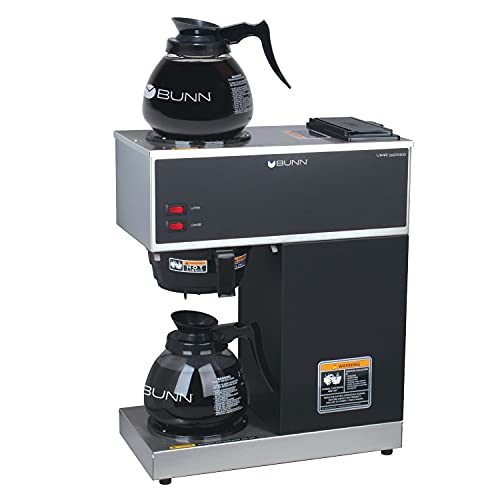
- BUNN BREWS DIFFERENTLY – The BUNN Speed Brew uses an internal…
- CLASSIC SPEED BREW look with a black finish and stainless-steel…
- DESIGNED AND ASSEMBLED in the USA.
- EXCLUSIVE DRIP-FREE CARAFE delivers the cleanest pour on the market…

- BUNN BREWS DIFFERENTLY – The BUNN Speed Brew uses an internal…
- CLASSIC SPEED BREW look with a stainless-steel faceplate and tank wrap…
- DESIGNED AND ASSEMBLED in the USA.
- EXCLUSIVE DRIP-FREE CARAFE delivers the cleanest pour on the market…
- Item Package Dimension: 27.24L x 22.24W x 11.98H inches
- Item Package Weight – 23.99 Pounds
- Item Package Quantity – 1
- Product Type – COFFEE MAKER
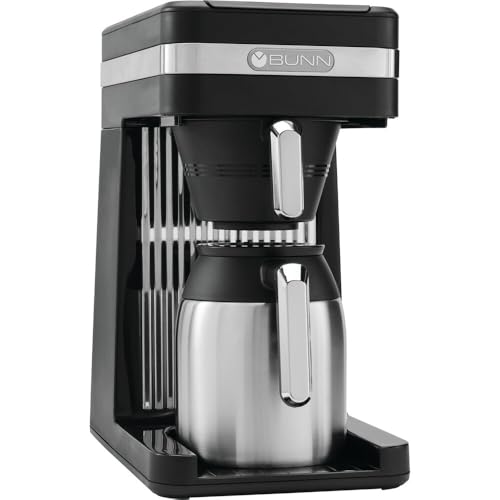
- BUNN BREWS DIFFERENTLY – The BUNN Speed Brew uses an internal…
- SIMPLE TO USE – Pour-in bowl features a water level indicator to show…
- MATTE BLACK FINISH with high-polished stainless-steel backsplash and…
- VACUUM-INSULATED, double walled thermal carafe maintains ideal serving…

- BUNN BREWS DIFFERENTLY – The BUNN Speed Brew uses an internal…
- SIMPLE TO USE – Pour-in bowl features a water level indicator to show…
- MATTE BLACK FINISH with high-polished stainless-steel backsplash and…
- DESIGNED AND ASSEMBLED in the USA.
Setup And Preparation
Setting up your Bunn coffee maker for the first time is easy. This step prepares the machine for brewing fresh coffee. Follow each step carefully to avoid mistakes. Proper setup ensures your coffee maker works well and lasts longer.
Unboxing And Parts Check
Start by opening the box carefully. Remove all items and lay them on a clean surface. Check for the main coffee maker unit, glass carafe, filter basket, and power cord. Confirm you have the user manual and any included accessories. Look for any damage or missing parts before proceeding.
Positioning The Coffee Maker
Place the coffee maker on a flat, stable surface. Make sure it is near a power outlet. Leave enough space around the machine for ventilation. Avoid placing it near water sources or heat. This position helps prevent accidents and allows easy access for filling and cleaning.
Adding Water To The Reservoir
Open the water reservoir lid on top of the machine. Pour clean, cold water into the reservoir carefully. Do not exceed the maximum fill line marked inside. Using fresh water improves coffee taste and machine performance. Close the lid securely after filling.
Installing The Coffee Filter
Lift the filter basket holder and place a paper coffee filter inside. Use the right size filter recommended by Bunn. Make sure the filter fits well without folding or tearing. This step keeps coffee grounds contained and helps with easy cleanup. Lower the basket back into place gently.
Starting Your First Brew
Starting your first brew with a Bunn coffee maker is simple and quick. This section walks you through the essential steps to get fresh coffee fast. Follow these clear instructions to enjoy a smooth brewing experience right from the start.
Powering On The Machine
Plug your Bunn coffee maker into a power outlet. Locate the power switch, usually on the side or front. Flip the switch to turn the machine on. The indicator light will glow, showing the machine is ready to start heating water.
Preheating The Water
The Bunn coffee maker heats water quickly. Allow a few minutes for the water to reach the right temperature. Avoid opening the lid during this time to keep the heat inside. The machine is ready when the indicator light signals the water is hot.
Measuring Coffee Grounds
Use fresh coffee grounds for the best flavor. Measure two tablespoons of coffee per six ounces of water. Place the coffee grounds into a clean coffee filter. Make sure the filter fits properly in the basket to prevent grounds from spilling.
Initiating The Brew Cycle
Pour the measured coffee grounds into the filter basket. Close the basket securely. Place your coffee pot or carafe under the brew funnel. Press the brew button or pull the brew handle to start the brewing process. Wait for the coffee to finish dripping before removing the pot.
Optimizing Coffee Flavor
Optimizing the flavor of your coffee enhances every cup brewed with your Bunn coffee maker. Small changes can make a big difference in taste. Focus on grind size, coffee-to-water ratio, and filter type to achieve the best flavor. These simple steps help you brew a rich, balanced cup each time.
Choosing The Right Coffee Grind
Use a medium grind for your Bunn coffee maker. Too fine a grind clogs the filter and slows brewing. Too coarse a grind leads to weak coffee. Medium grind allows water to flow evenly. It extracts flavor without bitterness or sourness.
Adjusting Coffee-to-water Ratio
Start with one to two tablespoons of coffee per six ounces of water. This ratio creates a strong but smooth brew. Adjust the amount to suit your taste. More coffee makes a bolder cup. Less coffee results in a lighter flavor. Measure coffee and water for consistency.
Selecting Proper Filter Types
Use paper filters made for drip coffee makers. They trap oils and fine particles for a cleaner taste. Rinse paper filters with hot water before brewing to remove paper flavor. You can also use reusable metal filters, but they may change the taste. Choose the filter type that suits your preference.
Common Issues And Fixes
Using a Bunn coffee maker for the first time may bring some common problems. These issues often affect brewing speed, water flow, coffee taste, and heating. Most problems come from simple maintenance needs or small blockages. Understanding these issues helps you fix them quickly. Regular cleaning and proper setup keep your coffee maker working well.
Slow Brewing Or No Water Flow
Slow brewing or no water flow often means a clog. Mineral buildup can block the spray head or water lines. Check the water inlet tube for kinks or bends. Clean the spray head using a vinegar solution to remove scale. Make sure the water valve opens fully. Regular descaling prevents these problems.
Overflow Problems
Overflow happens when the water reservoir is too full. Do not fill past the overflow line. A clogged spray head or seal can also cause overflow. Remove and clean these parts carefully. Check the seal for damage and reseat it properly. Overflow stops when the parts are clean and the water level is correct.
Weak Or Bitter Coffee
Weak or bitter coffee may come from water flowing too fast. Check if the flow restrictor is missing or damaged. Use the right coffee filter type for your Bunn machine. Dirty spray heads or coffee baskets can also affect taste. Clean all parts regularly to keep coffee fresh and strong.
Heating And Electrical Troubles
Heating problems include coffee maker not heating or a burning smell. These issues may signal a broken heating element or wiring problem. Unplug the machine immediately if you smell burning. Check the on/off switch for faults. Electrical repairs should be done by professionals to avoid risks.
Cleaning And Maintenance
Keeping your Bunn coffee maker clean and well-maintained ensures great-tasting coffee. Regular care prevents clogs and extends your machine’s life. This section covers essential cleaning and maintenance steps for first-time users.
Regular Descaling Process
Mineral buildup from water affects coffee flavor and machine function. Run a descaling cycle every 3 months or more often if water is hard. Use a descaling solution or white vinegar diluted with water. Fill the water reservoir and start a brew cycle without coffee grounds. Repeat if needed to remove all deposits. Rinse the machine with fresh water afterward.
Cleaning Spray Heads And Filters
Spray heads and filters collect coffee oils and residue. Remove and soak them in warm soapy water weekly. Use a soft brush to clear small holes and surfaces. Rinse thoroughly before placing them back. Clean spray heads keep water flowing evenly for consistent brewing.
Inspecting Seals And Connections
Check rubber seals and water line connections monthly. Look for cracks, dryness, or leaks. Replace worn seals to avoid leaks and pressure loss. Tighten loose connections to ensure smooth water flow. Proper seals keep your coffee maker safe and efficient.
Preventative Maintenance Tips
Use filtered water to reduce mineral buildup. Empty and clean the drip tray daily. Avoid harsh chemicals on machine parts. Run a water-only brew cycle weekly to flush the system. Store the coffee maker in a dry place when not in use. These steps keep your Bunn coffee maker working well longer.
Credit: www.partstown.com
Troubleshooting Tips
Starting to use a Bunn coffee maker can bring up some common issues. Knowing basic troubleshooting helps you fix problems quickly. This keeps your coffee fresh and the machine working well.
Most problems involve water flow, heating, leaks, or sediment. These tips help you solve them without stress. Keep your coffee routine smooth and enjoyable.
Fixing Water Flow Issues
Slow brewing often means a clogged spray head. Mineral buildup blocks water from flowing well. Clean the spray head regularly with vinegar to remove deposits.
Check the water inlet tube for kinks or bends. Straighten it to allow smooth water flow. Also, avoid overfilling the reservoir to prevent overflow.
If coffee tastes weak or bitter, inspect the flow restrictor. It controls water speed for proper brewing. Replace it if missing or damaged.
Handling Heating Failures
When the coffee maker does not heat, unplug it immediately. Heating element failure or faulty wiring may cause this. A professional repair might be necessary.
Sometimes the on/off switch malfunctions. Test it by turning the machine on and off. If no heat, check electrical connections carefully.
Regular cleaning prevents overheating problems. Remove mineral buildup that can harm heating parts. Use a descaling solution every few months.
Addressing Leaks And Drips
Leaks usually come from loose seals or worn gaskets. Tighten all connections and replace any damaged parts. Inspect the water reservoir for cracks.
Drips under the machine may signal a clogged or misaligned spray head. Clean it and ensure it fits correctly. Avoid using too much coffee grounds.
Place the coffee pot correctly under the spray head. Misplacement causes spills and drips. Use the right size pot made for your Bunn model.
Dealing With Sediment In Coffee
Gritty coffee can come from old coffee grounds or dirty filters. Use fresh coffee and clean the filter basket regularly. Replace filters as needed.
Mineral deposits in the water can cause sediment. Descale the machine with vinegar or a commercial cleaner. This keeps water lines clear and coffee pure.
Rinse the coffee pot and warming plate often. Leftover residue builds up and affects taste. Clean all removable parts with warm, soapy water.
Frequently Asked Questions
How Much Water Do You Put In A Bunn Coffee Maker For The First Time?
Fill the Bunn coffee maker’s water reservoir with fresh water up to the maximum fill line. Use about 3. 8 liters (1 gallon) for a full brew cycle. This ensures proper initial heating and cleaning before brewing coffee.
What Are The Common Problems With Bunn Coffee Makers?
Common problems with Bunn coffee makers include slow brewing, water overflow, weak coffee, heating failures, leaks, and mineral buildup clogging parts. Regular cleaning, descaling, and using correct filters prevent most issues. Electrical or complex problems may require professional repair.
How Long Does It Take For A Bunn Coffee Machine To Warm Up?
A Bunn coffee machine typically warms up in about 3 to 5 minutes. It maintains temperature continuously for quick brewing.
How To Operate A Coffee Machine Step By Step?
Fill the water reservoir and add ground coffee to the filter. Place the pot under the brew basket. Turn on the machine. Wait for brewing to finish. Serve and enjoy your fresh coffee. Clean the machine regularly for best performance.
Conclusion
Using a Bunn coffee maker for the first time is simple and quick. Start by reading the manual and cleaning the machine before brewing. Fill the water reservoir properly and use fresh coffee grounds. Turn the machine on and wait until it heats up.
Brew your coffee slowly to get the best flavor. Regular cleaning helps avoid common issues like clogs or weak coffee. Enjoy your fresh, hot coffee every day with little effort. This guide makes your first brew smooth and satisfying.

Hi, this is Cynthia A. Rose. Welcome to my Grinder related blog. Usually, I am busy with my kitchen and cooking all day. My main desire is to create a new recipe every day. But I have to use new tools every day to create new recipes. In this blog, I will share you how to use kitchen tools properly. I will not just share cooking related equipment, I will try to review all kinds of grinders like angle grinder among you. I hope my 12 years of experience will come in handy. Thanks!